


A job gets awarded, and everything is moving. The bid landed, the client signed off, and the numbers make sense. The timeline feels tight but doable, and the team is ready to get started. These are the moments production teams work toward, when weeks of pitching and revisions finally turn into real work.
Then the job kicks off, and things start to settle into a different pace.
Not in a bad way. Deadlines are still being met, and the work is progressing. But a few extra questions come up. Details get double-checked. People connect more often than expected to stay aligned. The energy is still there, but the process isn’t quite as streamlined as it could be.
As the team at Timmy puts it, momentum doesn’t usually break all at once. It breaks quietly.
And in production, that quiet break is usually happening between the bid and the build.
When systems fall out of sync
In commercial production, a job doesn’t fall apart all at once… it fragments.
The version sold during bidding isn’t always the one production executes, and finance is often working from another version based on what’s been formally approved.
At first, the differences are small. A timeline shifts. A deliverable gets added. A change lives in Slack but never makes it into the budget. None of it feels like a big deal.
But those gaps add up quickly.
- Production is working from what’s happening on the ground.
- The bid reflects what was sold.
- Finance tracks what’s been formalized.
Each version is valid, but no longer aligned.
The tricky part is this looks like progress, not a problem. As the job evolves, changes don’t always get reflected everywhere they should. Teams end up double-checking details, cross-referencing information, and reconciling mismatches instead of moving forward.
It’s common. It’s subtle. And it all points to the same issue: there’s no longer a single source of truth.
Keep the job connected from start to finish
Production is messy. Timelines shift. Scope creeps. Clients change their minds halfway through a sentence. That is not a problem. That is just how this work goes.
The real issue is what happens next.
When those changes do not carry across the entire job, things start to slip. Not in obvious ways, but in small moments that slow everything down.
So the goal is not to control the chaos. It is to stay connected to it. To make sure every change shows up everywhere it needs to, without your team chasing it down.
1. Start with a single, reliable version of the bid
Your bid shouldn’t disappear the second it gets approved. It should stick around and actually do some work.
This is where tools like Copper and Timmy come in. Copper is a CRM that lives inside Google Workspace, so your team can capture scope, timelines, deliverables, and client context right where they already work. Nothing gets buried or lost in translation.
Then Timmy, a production OS built for creative and production teams, takes that same information and carries it into execution.
So instead of asking, “Wait, what did we actually sell?” your team is already working from it.
When that foundation is clear:
- Production knows exactly what they are building
- Finance is working from the same numbers
- No one is digging through emails to find context
The job doesn’t restart after the deal closes. It just keeps going.
2. Remove re-entry and reinterpretation at handoff
This is where things quietly drift off course (and not because anyone made a big mistake), but because the same information gets handled too many times. It was copied into a new tool, rewritten in a doc, and explained again in a meeting. Each time, it shifts a little.
With Copper, your pipelines can actually reflect how your team works, from bid through pre-production. Automations kick in the moment a deal closes, so nothing gets stuck waiting for someone to move it forward.
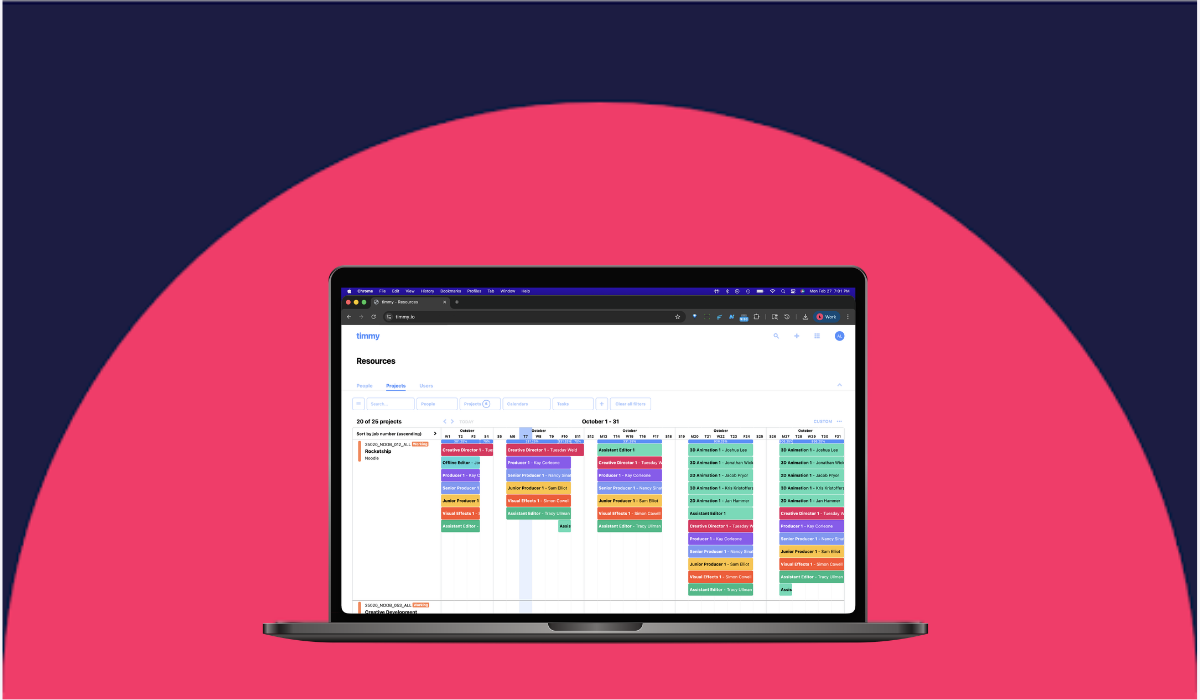
Then Timmy turns that into real work:
- Projects are created without starting from scratch
- Schedules are based on actual scope, not guesswork
- Resources are assigned with full visibility into the job
Now you just get a clean handoff from sales into production.
3. Tie budgets to live production changes
Budgets should move with the job. In reality, they often don’t. Production changes something. Finance finds out later. Now someone has to figure out what happened, when it changed, and whether it was approved.
That gap is where things get messy.
Timmy keeps budgets, forecasts, and actuals tied directly to what is happening in production. So when something changes, your numbers change in real time.
And because Copper holds the original deal details, you always have a clear starting point:
- What was sold
- What was approved
- What has changed along the way
4. Centralize communication where the work lives
Important decisions rarely happen in your system. They happen in Slack, in email, or on quick calls.
That’s fine. The problem is when they stay there.
Copper keeps early conversations connected to the deal, right inside Google Workspace. Emails, notes, and context aren’t floating around in someone’s inbox.
Then Timmy carries that context into production, alongside the actual work:
- Approvals are tied to deliverables
- Changes show up in schedules and budgets
- Files and assets live with the project
So instead of asking, “Where did that change come from?” your team can actually see it.
Everything has a place — and it’s in the same place the work is happening.
5. Design your system to handle chaos, not avoid it
Production will never be perfectly predictable. Trying to force it into a rigid system usually just creates more problems.
What you want instead is something that can flex without falling apart.
That is where Copper and Timmy work well together. Copper keeps the front end structured, so deals are clear and complete before production begins. Timmy takes over once the work starts and keeps everything updated as the job evolves.
Because both connect with tools your team already uses, like Google Drive, Slack, and QuickBooks, updates don’t get stuck in one place.
Instead, they move.
- A scope change shows up in the schedule
- A timeline shift affects resourcing
- A budget update reflects in reporting
So instead of constantly stopping to realign, your team keeps moving. And that is the real goal. Not perfection. Just steady momentum, even when things change.
The bottom line
If your team’s constantly checking, confirming, and translating information, it’s not a people problem. It’s a continuity problem.
When your systems stay aligned, everything starts to click. Decisions build on each other, teams stay in sync, and momentum carries from the first bid all the way through delivery without needing to be rebuilt at every stage.
That kind of flow doesn’t happen by accident. It comes from having the right setup in place from the start.
If you want to see what that looks like in practice, Copper’s a great place to start. You can try it free for 14 days and start structuring your deals in a way that actually carries into production.
And if you’re ready to take it further, Timmy helps you bring that same clarity into execution. One place where your projects, schedules, budgets, and resources stay connected so you can see how every decision impacts margin in real time.
Because when your tools are working together, your team doesn’t have to work harder to stay aligned. It just happens.