

Your pipeline’s full, your team’s busy, and yet deals still somehow stall out in the weirdest places. One minute a prospect’s replying instantly, the next they’ve vanished into the void (probably after saying “circle back next quarter”).
That’s the thing about CRM opportunity management in 2026 is it’s no longer just about tracking deals. It’s about understanding momentum, spotting risk early, and knowing which opportunities are actually worth your energy before your pipeline turns into a digital junk drawer.
Because the problem usually isn’t effort. Your team’s already sending emails, logging calls, updating records, and chasing follow-ups. The issue is how opportunities move (or don’t move) through your customer relationship management (CRM) platform.
This guide breaks down what modern CRM opportunity management actually looks like now — from smarter qualification processes to AI-powered forecasting to automation that handles repetitive work so your team can focus on relationships instead of admin tasks.
Key takeaways
- CRM opportunity management tracks qualified prospects with confirmed buying intent — not just random contacts sitting in your database.
- Pipeline stages work best when they reflect your actual sales process, with clear definitions for what moves a deal forward.
- AI and automation help reduce the 60% of rep time spent on non-selling tasks.
- Teams that review pipelines weekly see dramatically better forecast accuracy than teams that “check in whenever.”
- Modern opportunity management is about relationship orchestration, not just deal tracking.
What is CRM opportunity management?
At its core, CRM opportunity management is the process of tracking and managing qualified sales opportunities from the moment a prospect shows real buying intent all the way through to close.
But in 2026, that process looks a lot different than it did even a couple years ago.
Modern CRM opportunity management now includes things that would’ve felt wildly advanced not too long ago: AI-assisted prioritization, predictive forecasting, automated stakeholder tracking, and real-time visibility across teams. The goal isn’t just collecting more data. It’s helping sales teams understand which deals are healthy, where momentum is building, and where opportunities are quietly drifting off course before anyone notices.
Modern CRM opportunity management now includes:
- AI-assisted prioritization
- Predictive close-date modeling
- Automated stakeholder tracking
- Cross-functional collaboration visibility
- Real-time engagement insights
- Seamless sales-to-delivery handoffs
In other words, your CRM shouldn’t just act like a filing cabinet for sales activity. It should actively help your team make smarter decisions.
Because today’s buying cycles are messy. Buying committees are larger. Decision-making takes longer. And relying on “gut feel” forecasting is basically just manifesting with spreadsheets.
The best CRM opportunity management systems help teams move from reactive selling to proactive relationship management. Instead of scrambling to save deals at the last second, you can spot stalled engagement, missing stakeholders, or slowing momentum early enough to actually do something about it.
(Which is significantly less stressful for everyone involved.)
Lead management vs. opportunity management and why the distinction matters
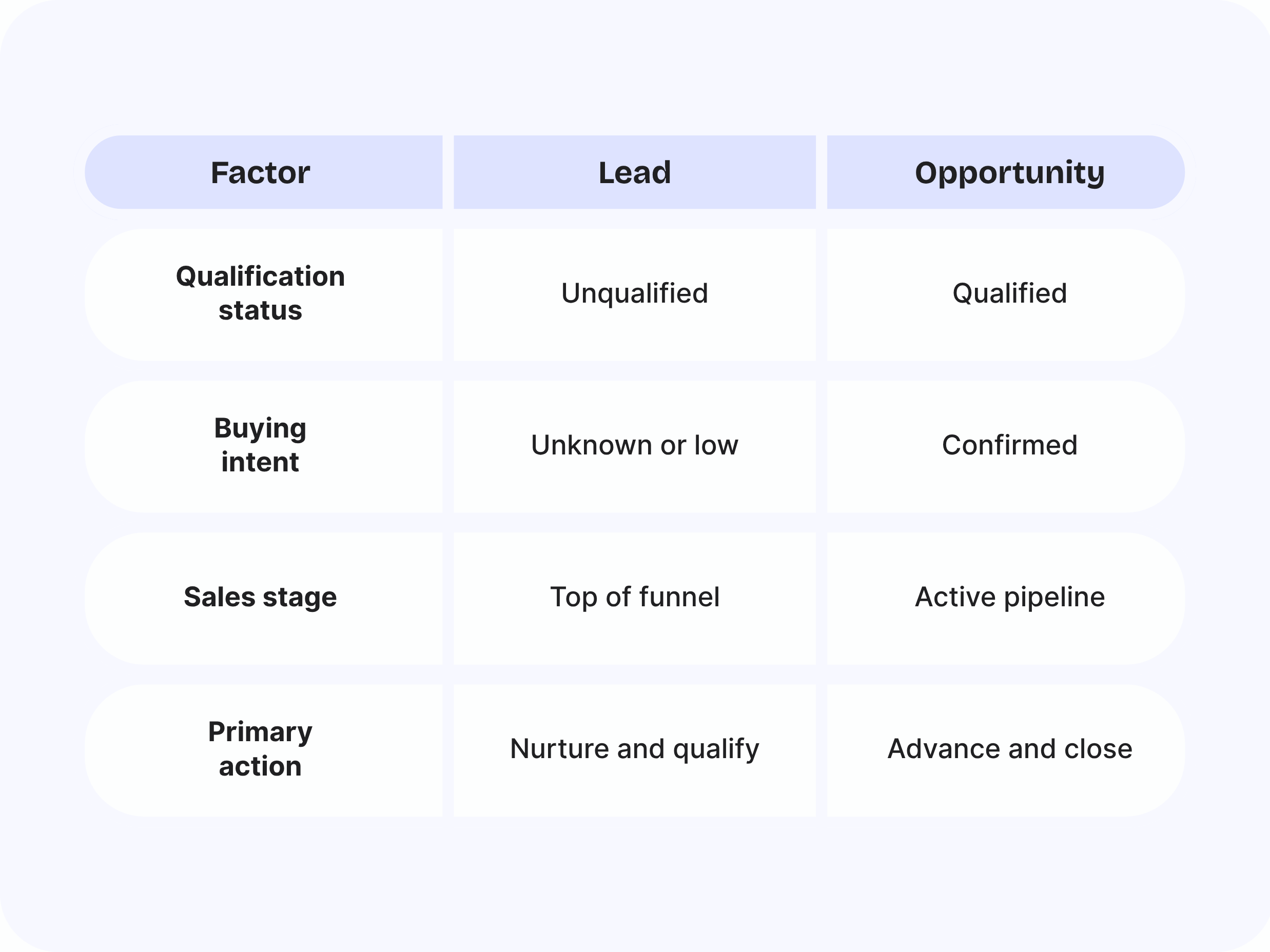
Leads and opportunities still get lumped together constantly, but the difference matters more now than ever.
- A lead is simply someone who might be interested.
- An opportunity is a qualified prospect with real buying intent.
That distinction sounds simple, but poor qualification is one of the fastest ways to destroy pipeline accuracy. When every lead gets treated like an opportunity, your forecasts inflate, your reps waste time, and your pipeline starts looking healthier than it actually is.
Here’s the difference:
In 2026, qualification also goes deeper than basic budget checks. Strong CRM opportunity management now needs understanding:
- Who’s involved in the buying committee
- Whether executive buy-in exists
- Competitive landscape concerns
- Technical validation requirements
- Procurement complexity
- Timeline realism
Because a single enthusiastic champion isn’t enough anymore. (Painful lesson, but an important one.)
One team that takes qualification seriously is Palantir, a full-service web design and development agency that separates its CRM into distinct pipelines for Outside Sales, Inside Sales, and Third Party Support.
That separation matters because not every opportunity enters the pipeline the same way. Some relationships are brand new. Others already come with trust and buying intent built in.
“With a number of our clients, it’s a case of whether we’re able to understand and address their needs. If we are, in most cases clients won’t consider anyone else,” says Ken Rickard, Director of Professional Services at Palantir.
Some organizations (like the University of Arizona) even keep Palantir on a pre-approved vendor list, meaning those opportunities enter the pipeline already heavily vetted. The difference shows up clearly in the numbers: Palantir’s Outside Sales pipeline closes at 27%, while Inside Sales closes at 65%.
Essential opportunity management capabilities for 2026
At this point, some CRM features are just expected.
If your system can’t automate follow-ups or show pipeline stages clearly, that’s not exactly groundbreaking anymore. But the best teams in 2026 are looking beyond the basics. They want tools that help them spot risks earlier, keep deals moving, and spend less time buried in admin work pretending they’ll “update the CRM later.”
Here’s what actually matters now.
Relationship visibility across your pipeline
Modern B2B sales almost never involve just one decision-maker anymore. You might have one contact who’s excited and ready to move forward, but if finance hasn’t weighed in, legal’s dragging things out, or another stakeholder suddenly disappears halfway through the process, deals can slow down fast.
That’s why visibility matters so much. A good CRM helps teams keep track of conversations, contacts, and activity across the entire account — and not just whoever replied last.
The best systems make it easier to see where momentum is building, where communication’s slowing down, and which relationships might need a little more attention before things stall out completely.
Because finding out procurement was never actually aligned after the proposal goes out? Now, that's rough.
Shared visibility across teams
Buyers expect a smoother experience now than they did even a few years ago.
Nobody wants to dig through endless email threads trying to find the latest proposal, contract version, meeting notes, or onboarding details. And internally, sales, delivery, and customer success teams all need visibility into what’s happening with an account too.
That’s where having everything connected inside your CRM makes a huge difference. When conversations, files, timelines, and updates live in one place, it’s much easier to keep everyone aligned without creating extra chaos.
And honestly, the smoother the buying experience feels, the easier it is for deals to keep moving.
(Funny how that works.)
Activity tracking that helps you spot stalled deals earlier
A lot of deals don’t die dramatically. They just slowly lose momentum. Maybe one contact stops replying... then another... then meetings start getting pushed out, and suddenly everyone’s saying things like “timing’s a little tricky right now.”
A good CRM helps teams spot those changes earlier by giving reps visibility into account activity, communication history, follow-ups, and engagement trends all in one place.
That makes it easier to notice when:
- Conversations suddenly slow down
- Follow-ups are getting missed
- Deals are becoming dependent on one contact
- Opportunities have been sitting untouched for too long
And thankfully, reps don’t have to keep all of that floating around in their heads anymore.
Dynamic forecasting with velocity metrics
A healthy pipeline isn’t just about how many deals you have. It’s about whether those deals are actually moving.
Modern forecasting tools go beyond simple pipeline totals and show things like:
- How quickly deals move between stages
- Where opportunities tend to slow down
- Which accounts are gaining momentum
- Which ones are quietly stalling out
Because a $200K opportunity that’s actively progressing is very different from a $200K opportunity that’s been sitting untouched for 45 days while everyone politely pretends it’s still alive.
Native workspace integration
Most sales reps already spend their day inside Gmail, Calendar, Docs, Slack, and meeting notes. So when a CRM feels disconnected from the way people already work, adoption usually falls apart pretty fast.
Nobody wants to finish a meeting and then spend another 20 minutes manually copying notes into a separate system they barely remember to open.
That’s why the best CRMs now work directly inside the tools teams already use every day. Copper works seamlessly in Google Workspace and is built around exactly that idea, letting reps manage relationships, opportunities, follow-ups, and collaboration directly inside Gmail, Calendar, and Drive.
(Which is convenient considering most reps already have Gmail permanently open anyway.)
Seven opportunity management practices that separate winners in 2026
The best sales teams in 2026 aren’t necessarily working longer hours. They’re just working with better systems, cleaner processes, and way more visibility into what’s actually happening across their pipeline.
Here’s what top-performing teams are doing differently.
1. Let AI handle prioritization and next-best-actions
Reps already have enough to juggle without manually sorting through every opportunity trying to figure out what deserves attention first.
That’s why more teams are using AI to surface things like:
- Which deals need follow-up right now
- Which accounts are showing buying signals
- Which opportunities are at risk of stalling
- What next step is most likely to move the deal forward
Instead of wasting time deciding where to focus, reps can spend more energy actually building relationships and closing deals.
2. Score opportunities with fit, intent, and urgency
A lot of teams still score opportunities based mostly on activity. Someone opened an email? Great. Attended a meeting? Even better.
But activity alone doesn’t always tell you whether a deal is actually likely to close. That’s why smarter teams look at opportunities through three different lenses instead of relying on surface-level engagement.
Instead, evaluate opportunities on three dimensions:
- Fit: Does this prospect match your ideal customer profile?
- Intent: Are they showing real buying signals?
- Urgency: What's their timeline for making a decision?
3. Align opportunity stages to buyer milestones, not seller activities
A lot of pipelines are still built around seller actions instead of buyer progress.
But “proposal sent” doesn’t actually tell you much. The buyer could be fully committed... or they could’ve completely stopped paying attention two days ago.
The strongest teams build stages around real buyer milestones instead, like:
- Technical review completed
- Legal involved
- Budget approved
- Procurement aligned
That creates much better visibility into where deals actually stand.
4. Automate stage progression and follow-ups
CRM automation can trigger tasks, reminders, and stage updates based on activity or buyer behavior. Copper, for example, automates follow-ups directly from Gmail, so nothing slips through the cracks.
5. Set engagement thresholds, not just time limits
Just because a deal is moving quickly doesn’t mean it’s healthy.
Some opportunities fly through stages with barely any stakeholder engagement at all, which usually becomes a problem later.
That’s why smart teams look at engagement quality alongside deal speed. Things like:
- Number of active stakeholders
- Meeting consistency
- Cross-functional involvement
- Communication frequency
Because a fast-moving deal with weak engagement can still fall apart very quickly.
6. Integrate your CRM with the tools you already use
A CRM should make work easier, not give your team another tab to ignore.
When your CRM fits naturally into the tools people already use every day, adoption gets a whole lot easier. Reps spend less time jumping between platforms, manually copying notes, or forgetting to update deal activity after meetings.
That’s why integration matters so much. Copper’s Google Workspace integration lets teams manage opportunities directly inside Gmail, Calendar, and Drive, so work keeps moving without constant context-switching.
It’s also important to choose a CRM that connects with the rest of your tech stack — not just email and calendar tools. Whether it’s marketing platforms, proposal software, project management apps, or invoicing systems, strong integrations help your team keep information flowing across the entire customer journey instead of trapping data in separate systems.
And honestly, the less time reps spend doing admin work, the more time they can spend actually building relationships and closing deals. Which is kind of the whole point.
7. Bridge sales and delivery before the contract signs
The handoff between sales and implementation is where a lot of customer relationships either start strong or immediately get messy.
That’s why more teams involve customer success and delivery teams earlier in the process instead of waiting until contracts are signed.
It helps everyone align on expectations, timelines, scope, and onboarding before anything gets finalized.
And it dramatically reduces those painful post-sale conversations where implementation teams ask, “Wait… we promised what?”
How AI and automation are reshaping opportunity management
AI and automation are making opportunity management way less tedious.
Right now, sales reps spend nearly 60% of their time on non-selling tasks like updating records, logging notes, chasing follow-ups, and trying to remember where a deal left off after six back-to-back meetings. Not exactly the dream.
That’s why more teams are using AI to take repetitive work off their plate while helping reps focus on the deals that actually need attention.
A few ways that shows up day-to-day:
- Predictive scoring helps reps figure out which opportunities are most likely to close instead of treating every deal like it deserves the exact same energy.
- Automated data capture logs meeting notes, emails, and activity automatically, so nobody has to spend Friday afternoon updating the CRM retroactively. (A task everyone definitely loves.)
- Next-best-action suggestions help reps know what to do next, whether that’s following up with a stakeholder, booking a meeting, or rescuing a deal that’s quietly starting to drift.
The point isn’t to replace relationship-building. It’s to give reps more time for it.
Copper uses automation to cut down on busywork so teams can spend more time building relationships and closing deals — not babysitting admin tasks.
Common opportunity management mistakes that kill deals
Even strong sales teams fall into habits that slowly wreck their pipeline.
And the tricky part is that most of these problems don’t look serious at first. Then forecasting season rolls around and suddenly everyone’s staring at the dashboard like, “...wait.”
Teams that review their pipeline weekly hit 87% forecast accuracy, compared to just 52% for teams that review inconsistently. Usually, the difference comes down to catching problems early instead of letting deals quietly rot in the background for three months.
A few of the biggest offenders:
- Skipping qualification fills your pipeline with deals that were never really deals to begin with. More opportunities doesn’t always mean more revenue.
- Inconsistent stage definitions make reporting messy fast. If every rep defines “proposal stage” differently, forecasting turns into educated guessing.
- Neglecting data hygiene leads to outdated contacts, missing notes, and awkward follow-ups nobody saw coming.
- Overloading the pipeline makes it harder to spot the opportunities that are actually moving. Sometimes removing dead deals is healthier than keeping them around “just in case.”
- Ignoring deal velocity is another big one. When deals suddenly slow down, there’s usually a reason — missing stakeholders, weak engagement, unclear timelines, or approvals stuck somewhere in the void.
Getting started with modern opportunity management in Google Workspace
The best CRM opportunity management systems don’t feel like “another platform” your team has to remember to update. They just fit naturally into the way people already work.
That’s why more teams are choosing CRMs that live directly inside Google Workspace. When your pipeline works alongside Gmail, Calendar, Drive, and Docs, it’s way easier to keep opportunities moving without constantly jumping between tabs or chasing down scattered information.
If you’re getting started, don’t overcomplicate it. Start with clean data, build stages that actually reflect your buyer journey, and introduce automation gradually. You don’t need to completely reinvent your sales process overnight to improve CRM opportunity management in a meaningful way.
And honestly, the easier your CRM is to use, the more your team will actually want to use it. (Revolutionary concept, we know.)
Copper is built around this exact “work where you work” approach, with native Gmail integration that helps teams manage relationships, CRM opportunity management workflows, follow-ups, and collaboration right inside the tools they already use every day.