
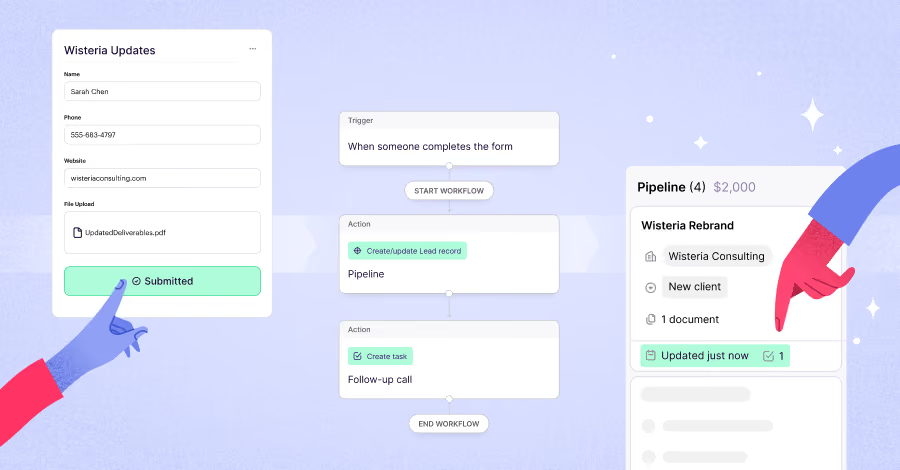

Forms are everywhere. From “contact us” pages to event sign-ups, they’re one of the easiest ways to collect information from prospects and customers.
But for most teams, forms only show up at the very beginning of the journey.
A lead fills out a form, a record gets created, and then… the process breaks. Information becomes disjointed and is scattered across emails, docs, and Slack threads. Teams spend time chasing details instead of moving work forward.
It doesn’t have to be that way.
When forms are connected directly to your CRM, they become more than a data collection tool. Many CRMs offer forms to capture information and create records — but the real value comes when forms can also update those records as work progresses.
And for teams looking to go even further, that same data can power email automation and customer journeys — turning a single submission into ongoing, meaningful engagement across the lifecycle.
That’s what allows forms to guide work through every stage of the client lifecycle, from first touch to final delivery and beyond.
Here are five ways to use forms to keep your records current and your work moving.
1. Capture early interest with lead forms
Every relationship starts somewhere. For many teams, that starting point is a website form, a webinar registration, or a “get in touch” request.
Lead forms help you collect this early-stage interest in a structured way. Instead of managing inquiries across inboxes or spreadsheets, submissions create or update Lead records in your CRM automatically.
That means your team can:
- review and qualify new inquiries faster
- prioritize high-intent prospects
- keep all early interactions organized in one place
Example:
A consulting firm uses a lead form on their website to capture inbound requests. Each submission creates a Lead record, making it easy for the team to review and decide which opportunities to pursue.
2. Turn intake into action with client onboarding forms
Once a lead is qualified, the next step is getting the information needed to actually start the work.
This is where many teams hit friction. Client details are collected through back-and-forth emails, scattered documents, or calls that need to be manually documented later.
Client intake forms simplify this process by collecting everything upfront and turning it into action.
When connected to your CRM, these forms can:
- create or update People records
- generate new pipeline records
- capture key details like scope, budget, and timeline
Example:
An agency sends a client onboarding form after a deal is confirmed. The submission creates a new pipeline record with all the project details, so the team can move straight into planning without chasing missing information.
3. Collect project details with scoping forms
Not all information is available at the start. As projects move forward, teams often need more detailed inputs to refine scope, pricing, or timelines.
Instead of relying on long email threads, scoping forms provide a structured way to gather this information.
These forms can be sent mid-process to collect:
- project requirements
- campaign goals and deliverables
- budget confirmations
- stakeholder inputs
The key benefit is consistency. Every response is captured in the same format, making it easier for teams to review and act on the information.
Example:
A creative studio sends a scoping form to gather campaign details, brand guidelines, and timelines, so the team can move quickly from concept to proposal.
4. Keep work moving with mid-project updates
As work progresses, details change. Timelines shift, priorities evolve, and new information comes up.
This is where forms can play a powerful role beyond intake.
Instead of manually updating records or tracking changes across tools, you can use forms to collect updates directly and apply them to existing records in your CRM.
This allows teams to:
- gather updates at key milestones
- keep records accurate without manual edits
- reduce back-and-forth communication
Example:
A marketing team sends a form to confirm campaign details before launch. The client updates final copy and timelines, and the pipeline record reflects those changes instantly.
And when those updates are paired with email automation, they can trigger the next step automatically — whether that’s a follow-up, a status update, or the next phase of a project.
For teams using platforms like Tarvent, this goes a step further by extending those triggers into ongoing, lifecycle engagement. Updates in Copper, like pipeline changes or record updates, can initiate automated journeys that handle follow-ups, internal actions, and next steps automatically. These journeys can also create tasks, activities, or pipeline updates directly in Copper, keeping work moving without manual coordination. From there, contacts can be segmented based on behavior over time, with follow-up and re-engagement driven by what’s actually happening throughout the project. That means more timely, relevant communication not just in the moment, but across the entire client lifecycle. Check out the Tarvent x Copper integration here.
5. Capture feedback and unlock repeat business
The relationship doesn’t end when a project is delivered. In many cases, this is where the next opportunity begins.
Feedback forms make it easy to capture insights, testimonials, and follow-up opportunities in a structured way.
Using CRM-connected forms, you can:
- log feedback directly on existing records
- identify opportunities for expansion or renewal
- maintain a complete view of the client relationship
Example:
After completing a project, a consulting firm sends a feedback form. Responses are logged against the existing record, helping the team identify satisfied clients and potential upsell opportunities.
Forms that support the full lifecycle
When used thoughtfully, forms can support every stage of the client journey:
- capture early interest with lead forms
- create new work with onboarding and intake forms
- update records as projects evolve
- act on submissions with workflows and follow-ups
Instead of collecting data in one place and working in another, everything stays connected.
Forms capture the right information.
Email ensures timely follow-up and consistent communication.
If you want to take lifecycle support to the next level, Tarvent extends Copper-driven follow-ups into ongoing, behavior-driven engagement. Using automated journeys, teams can move beyond one-time actions into campaigns, nurture sequences, and re-engagement that adapt over time. Instead of data staying siloed, engagement activity is continuously tracked and synced back into Copper, giving your team clear visibility into how contacts are engaging and helping identify the right moment to follow up, prioritize outreach, or take action inside the pipeline.
The result is a smoother process for your team and a better experience for your clients — from first touch to long-term relationship.
Where to start
You don’t need to overhaul everything at once.
Start with one use case where your team is currently chasing information, like client intake or project scoping. Replace that process with a form, connect it to your CRM, and build from there.
Over time, you’ll create a system where every submission leads to a clear next step.
And that’s when forms stop being just a collection tool — and start becoming a key part of how your business runs.