

If you’re searching for a Nutshell CRM alternative, I’m willing to bet your customer relationship management (CRM) platform is “fine”… but also quietly driving you a little nuts.
It works. Technically. Deals are in there. Contacts are in there. Reports exist.
But somehow it still feels like you’re spending more time managing the CRM than actually moving deals forward… and that’s usually the tipping point.
Teams don’t go looking for a new CRM because they’re bored. They start looking because the current one feels like friction. There are too many clicks, too much manual logging, and way too many “wait, where do I find that again?” moments. At some point, you realize you’re wrestling with your tools instead of letting them work for you.
To be clear, Nutshell is a solid CRM. It has loyal users and does a lot of things right. But as your business grows, your pipeline gets more complex, and your team’s workflow evolves, what once felt manageable can start to feel… heavy.
Especially if your team lives inside Google Workspace and your CRM doesn’t quite feel like it belongs there.
The good news? You have options.
In this guide, we’re breaking down the best Nutshell CRM alternatives. We’ll look at what each one is actually good at (not just what the pricing page says), who it’s best for, and which CRM will help your team move faster instead of adding another layer of busywork.
Because your CRM shouldn’t feel like a second job. It should feel like backup.

Exit Design chooses Copper over HubSpot — and isn’t looking back
Why teams look for a Nutshell CRM alternative
Most teams don’t wake up and think, “You know what would be fun this week? A CRM migration.”
If you’re searching for a Nutshell CRM alternative, it’s usually because something isn’t clicking anymore, and you’re ready for a setup that feels more natural.
A big reason teams start shopping around is automation.
One of the biggest reasons teams start eyeing a new CRM? Automation envy.
The first time you see a CRM automatically log emails, capture meetings, trigger follow-ups, and move deals along without someone babysitting it… something shifts. You start realizing how much time you’ve been spending on manual updates. And once you’ve had a taste of that kind of efficiency, it’s almost impossible to go back to manually logging every call like you’re writing entries in a sales diary.
Because here’s the truth: when a rep has to choose between “update the CRM” and “follow up with a hot lead,” the CRM loses every time. Not because your team is lazy. Because they’re prioritizing revenue. And a modern CRM should support that, not compete with it.
Pricing is another big trigger. As teams grow, they want clarity. What are we paying today? What happens when we add five more users? Are we going to unlock one feature and accidentally triple our bill? If pricing feels confusing, layered, or unpredictable, it creates hesitation. And hesitation around your core sales tool is never a great sign. Teams start looking for options with cleaner tiers and clearer value.
Then there’s the interface itself. Some CRMs feel like they were designed for massive enterprises with a full-time ops team managing permissions, dashboards, and workflows. If you’re a small or mid-sized team, that level of complexity can feel like overkill. And when a CRM feels overwhelming, adoption quietly drops. People avoid it. They create side systems. They “forget” to update it.
At that point, it’s not really working anymore — even if it technically still is.
Must-have features in a modern CRM
Before you pick your next Nutshell CRM alternative, it helps to know what a modern CRM should do without making you jump through hoops. A good CRM should reduce busywork, keep your team aligned, and make it easier to track relationships and revenue in one place.
Here are the features you should expect from any strong alternative:
- Contact management: Store contacts and companies, track relationship context, and keep communication history in one place.
- Pipeline tracking: Make it easy to see deal stages, next steps, and what needs attention.
- Email integration: Sync email so you’re not copy/pasting conversations into a CRM like it’s a ritual.
- Reporting and forecasting: Understand pipeline health and performance without needing a separate spreadsheet universe.
- Mobile access: Your CRM should be usable on the go, not just technically “available” on mobile.
- Workflow automation: Automate follow-ups, reminders, lead routing, and stage-based actions whenever possible.
- Customization: Support custom fields, workflows, and pipelines that match how your team sells.
- Integrations: Connect with the rest of your stack so your CRM isn’t an island.
- Lead capture: Use website forms and lead tools to get inquiries into the CRM cleanly and quickly.
If your team is Google Workspace-first, you’ll also want a CRM that integrates seamlessly with Gmail and Google Calendar. That one detail can make the difference between a CRM that gets used daily and one that gets ignored until the pipeline meeting.
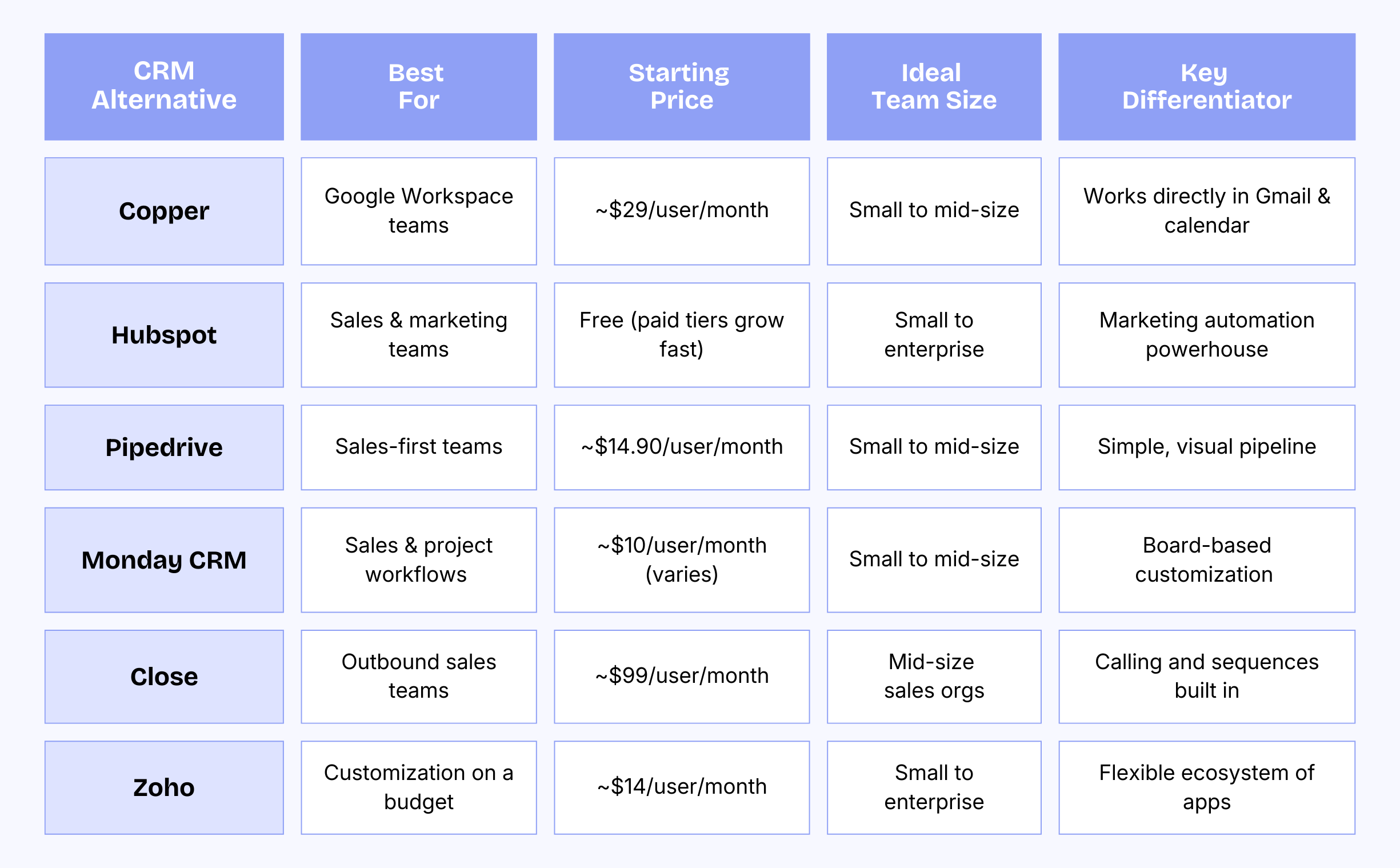
Nutshell CRM software alternatives at a glance
Reviews of the top Nutshell competitors
Now for the fun part: let’s look at the top Nutshell CRM alternatives and what they’re actually like to use.
1. Copper
If your team lives in Google Workspace — Gmail always open, Calendar running your life — Copper is going to feel refreshingly obvious.
It was built specifically for Google Workspace users, which means it works inside Gmail and Google Calendar instead of sitting off to the side like a system you have to “remember” to update. Copper automatically captures emails, meetings, and interactions in the background, so your CRM stays current without manual data entry. And that’s a big deal, because most CRM adoption fails when updating it feels like extra homework.
Copper is a strong Nutshell CRM alternative for agencies, consultants, and professional services teams who care about relationship-driven selling but don’t want complexity slowing them down.
You get customizable Pipelines that match how you actually sell, workflow automation to keep deals moving, and Pipeline email automations triggered by stage changes so follow-ups happen without chasing reps. Add website forms for sorting inquiries and integrations with hundreds of other apps, and you’ve got a CRM that fits your workflow instead of fighting it.
Key features:
- Native Gmail and Google Calendar integration
- Automatic contact capture and activity tracking
- Customizable pipelines and pipeline tracking
- Workflow automation
- Pipeline email automations triggered by stage changes
- Website forms for sorting inquiries
- Chrome extension for working directly in Gmail
- Mobile apps for iOS and Android
- Custom reporting dashboards
- Integrations with hundreds of other apps
2. HubSpot
HubSpot is the CRM equivalent of “go big or go home.” It’s powerful, packed with features, and comes with a free tier that makes it easy to dip your toe in. But once you’re in, you’ll quickly realize it’s more than just a CRM — it’s a full sales and marketing machine. If your team runs inbound campaigns, builds landing pages, nurtures leads, and wants everything connected in one ecosystem, HubSpot earns its reputation.
As a Nutshell CRM alternative, HubSpot is a strong choice for teams that want their pipeline, email marketing, automation, and reporting all living under one roof. You can track deals and launch campaigns without juggling five different tools.
The flip side? It can feel like a lot if you’re a lean team that just wants something simple and fast. And while the free tier is generous, costs can climb quickly as you unlock more features and add users. HubSpot is fantastic when you’re ready for a full platform, it just may be more horsepower than some teams actually need.
Key features:
- Free CRM tier
- Email marketing automation
- Landing page builder
- Live chat
- Meeting scheduler
- Extensive app marketplace
- Marketing analytics
- Sales pipeline tracking
3. Pipedrive
Pipedrive is for teams who want their CRM to do one thing really well: keep sales moving. It’s clean, visual, and built around the pipeline view, so reps can instantly see what’s in progress, what’s stuck, and what needs a follow-up (without digging through a maze of tabs). If your current CRM feels cluttered or overly complicated, Pipedrive feels like a breath of fresh air.
As a Nutshell CRM alternative, it’s best for sales-first teams that want clear deal tracking, activity reminders, and lightweight forecasting without a bunch of extra bells and whistles. Pipedrive isn’t trying to be your marketing platform, your project manager, and your customer success hub all at once — which is exactly why a lot of teams love it.
Just keep in mind that if you want deeper automation or more robust post-sale workflows, you’ll probably need to pair it with other tools to round things out.
Key features:
- Visual pipeline management
- Activity reminders
- Email integration and tracking
- Sales forecasting
- Customizable fields
- Mobile apps
- AI-powered sales assistant
- Goal setting and tracking
4. Monday CRM
Monday CRM is what happens when a CRM decides it doesn’t want to look like a traditional CRM anymore. Instead of rigid layouts and standard deal views, you get colorful, customizable boards that feel more like a collaborative workspace than a sales database. If your team already uses Monday.com for project management, adding Monday CRM can feel natural — like you’re expanding something you already understand instead of learning a whole new system.
As a Nutshell CRM alternative, Monday CRM really stands out for teams that manage sales and delivery side by side. You can track deals, client onboarding, and ongoing project work all in one place, which is a huge win for agencies and service-based businesses juggling multiple clients. The trade-off? If your team prefers classic CRM dashboards and traditional contact records, the board-first approach can take some getting used to. It’s flexible and powerful — but it definitely leans more “build-your-own flow” than “plug-and-play CRM.”
Key features:
- Customizable visual boards
- Project management integration
- Contact management
- Email sync
- Automation recipes
- Timeline views
- Collaboration tools
- Custom dashboards
5. Close
Close is built for outbound sales teams that need speed and consistency. It’s designed around execution, so reps can call, text, email, and run sequences without bouncing between tools.
If your team does a lot of outreach and wants a CRM that feels like a sales command center, Close is a serious contender.
As a Nutshell CRM alternative, Close is best for teams that are doing high-volume outbound sales and want built-in calling and sequencing. It’s excellent at keeping reps moving and maintaining outreach discipline. The trade-off is that it’s priced for teams that will fully use those features, and it’s less focused on marketing workflows or relationship-driven selling compared to other CRMs.
Key features:
- Built-in calling and SMS
- Email sequences
- Call recording
- Predictive dialer
- Sales automation
- Reporting and analytics
- Lead management
6. Zoho CRM
Zoho CRM is a strong option for teams that want customization and flexibility, especially if they’re already using other Zoho tools. It’s part of a large ecosystem, and it can be configured heavily to match your workflows, reporting needs, and process design. For teams that want control, Zoho offers a lot for the price.
As a Nutshell CRM alternative, Zoho works best for teams willing to invest time in setup. You can build custom fields, automate workflows, and create dashboards that fit your business. The trade-off is that Zoho can feel complex for teams that want something immediately intuitive and plug-and-play. It’s powerful, but it may take more effort to configure and maintain.
Key features:
- Advanced customization options
- AI sales assistant (Zia)
- Workflow automation
- Multi-channel communication
- Canvas design studio
- Integration with 40+ Zoho apps
- Territory management
- Social media integration
Step-by-step plan to migrate from Nutshell without losing data
CRM migration sounds scary until you realize it’s mostly just a matter of doing things in the right order.
If you’re switching to a Nutshell CRM alternative, your two main goals are protecting your data and keeping disruption low so your team can keep selling while you make the move.
1. Capture existing data
Export everything you need from Nutshell, including contacts, companies, deals, notes, and activity history. Make sure you include any custom fields your team relies on so nothing important disappears during the move.
2. Map fields and workflows
Decide how your Nutshell fields should translate into your new CRM, then recreate key workflows like pipeline stages, lead routing, and ownership rules. This is also a great time to clean up anything outdated, like old stages or fields no one uses anymore.
3. Run a test import
Import a small sample dataset first to catch formatting issues, duplicates, or missing fields before you do the full migration. It’s a quick step that can save you a lot of cleanup later.
4. Launch in phases
Roll out the new CRM to a small group first (typically your power users, sales leads, or ops) so you can validate workflows and iron out bumps. Once it’s running smoothly, expand the rollout to the rest of the team.
5. Monitor and optimize
Track adoption and gather feedback after launch. Adjust dashboards, automations, and pipelines based on how people actually use the CRM, because the best setup is the one your team will stick with.
Why Copper fits Google-centric teams best
At the end of the day, choosing a Nutshell CRM alternative comes down to one simple question: will your team actually use it? And if your team is Google Workspace–centric, the best CRM is the one that fits naturally into that world instead of forcing everyone to change how they work.
Copper is built for teams that rely on Gmail and Google Calendar every day, which makes it an easy yes for companies that want a CRM that feels intuitive, fast, and low-maintenance. It helps you stay organized without adding extra complexity, which is exactly what growing teams need when pipelines get busier and follow-ups matter more.
If you want a CRM that works with your workflow (not against it), try Copper for 14 days free.