
Commercial roofing has a funny sales cycle. You might quote a 120,000-square-foot TPO tear-off in March, chase three GCs and a facilities director through June, and hear "we're pushing it to next budget year" in August. Then the same property manager calls 18 months later about a different building and assumes you remember everything.
That's the job a CRM does. Not measuring the roof. Not running the crew. Remembering who you bid to, what you promised, and who sends you the next one.
Most lists of CRM software for roofing contractors are written for storm-chasing residential shops. This one is for commercial teams. We'll cover what a roofing CRM should actually do, compare six of the most popular options, and give you a simple way to pick.
Key takeaways
- The best CRM software for roofing contractors depends on your business model. Insurance restoration, residential retail and commercial bidding need different tools.
- Commercial roofers need relationship tracking first. Long bid cycles, several decision makers and repeat work from the same GCs and property managers.
- Roofing-specific features matter less on commercial work. Aerial measurement and insurance supplements are huge for residential storm work and less important for flat commercial roofs you survey on site.
- Pick the CRM your team will actually open. If your estimators live in Gmail, a CRM that works inside Gmail wins on adoption.
What roofing CRM software does for commercial contractors
Roofing CRM software is one place to track every lead, bid, job and client conversation. Instead of a bid spreadsheet, three inboxes and an estimator's memory, everyone sees the same record.
Commercial roofing needs that more than most trades, for a few reasons:
- Long sales cycles. Re-roof projects wait on capital budgets, board approvals and the weather. A bid can sit open for months.
- Lots of people in the room. GCs, architects, owners, property managers, facilities directors and manufacturer reps all have a say.
- Repeat relationships. The property manager with 14 buildings is worth more than any single job. So is the GC who keeps inviting you to bid.
- Service and maintenance work. Inspections, warranty visits and repairs keep you in front of owners between big projects.
The right CRM depends on how you sell. A residential retail shop, an insurance restoration company and a commercial contractor bidding to GCs will each be happiest with a different tool. That's why the comparison below is built around "best for" instead of a single winner.

Features to look for in roofing CRM software
Every vendor's feature page looks impressive. These are the features that actually change your week.
Visual sales pipeline for tracking bids and active jobs
A drag-and-drop board shows every bid by stage: invited, submitted, following up, awarded. When you have a dozen long-cycle commercial bids open, seeing them on one screen beats scrolling a spreadsheet and hoping someone updated it. Bids stop going quiet because nobody noticed they were quiet.

Contact and relationship management for GCs, architects and property managers
Commercial roofing runs on repeat relationships. A good CRM keeps every contact's history in one place: past bids, jobs you've done for them, emails, calls and notes. So when that property manager calls 18 months later, anyone on your team can pick up the conversation without asking "sorry, which building was that?"
It should also handle one job with several GCs bidding it. You want to see every GC you quoted, what you sent each one, and who actually awards you work.
Email tracking and automation inside your inbox
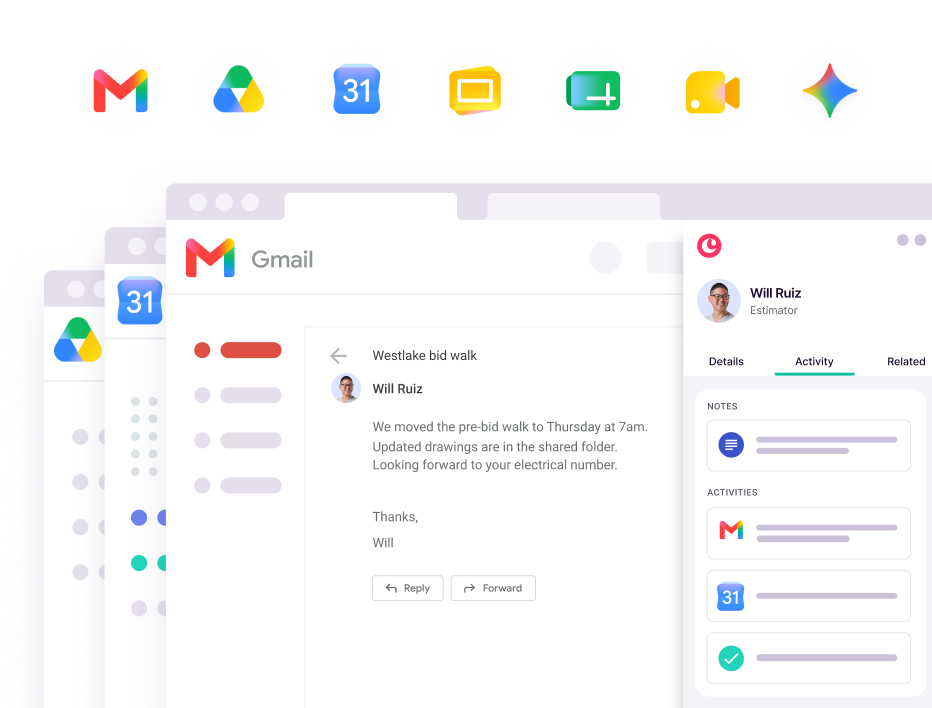
Here's where most CRMs lose people. If your estimators have to copy every email into a separate app, they'll do it for about two weeks. Look for a CRM that works inside your inbox and logs emails, calls and meetings for you.
If your team runs on Google Workspace, a CRM that sits in Gmail, like Copper, means no tab-switching and no typing it in twice. The record fills itself in from work your team is already doing.
Mobile access from the job site
Estimators and project managers spend half their week on roofs and in trucks. They need to update a bid status, add photos from a survey and check a client's history from their phone. If the mobile app is clunky, the field won't use it, and your CRM will only ever be half true.
Integrations with estimating, accounting and measurement tools
Common roofing integrations include QuickBooks, aerial measurement tools like EagleView and Hover, and supplier ordering through distributors like ABC Supply and SRS. For commercial contractors, accounting sync matters most. It ties invoices and job costs back to the client, so you can see which relationships are actually profitable.
Reporting on pipeline value and job performance
Once you have more than a handful of estimators, you need real-time numbers. How much is out to bid? What's your hit rate by GC? Which type of work makes money? A CRM should answer those in a minute, not after someone rebuilds the spreadsheet on a Sunday.
The best roofing CRM software for contractors compared
Here's how six popular options stack up, and the type of roofing company each one suits best. Pricing changes often, so confirm current plans with each vendor.
- Copper: best for commercial roofing teams that sell through relationships and work in Gmail.
- AccuLynx: best for insurance restoration and storm work.
- JobNimbus: best for residential sales teams that want visual boards and supplier ordering.
- Roofr: best for small residential roofers who want measurements and proposals in one place.
- ServiceTitan: best for large roofing companies running several service lines.
- Jobber: best for solo operators and mixed-trade shops that need simple scheduling and invoicing.
Copper
Best for: commercial roofing contractors who live in Gmail and Google Calendar and win work through GC, owner and property manager relationships.
Copper is the CRM that works inside Google Workspace, and the only CRM that's a Recommended for Google Workspace app. Its Chrome extension puts your contacts, bids and tasks right next to your email, so estimators track bids without leaving Gmail.
- Emails, calls and meetings log to the client record automatically
- Custom bid stages, with follow-up reminders and email automations
- Separate pipelines for each division, like commercial re-roof, service and maintenance, with one view for leadership
- Mobile app with full client history for the field
- QuickBooks Online integration to see invoice status on the client record
Specialty contractor Egan Company runs a separate pipeline for each of its trade groups in Copper, while leadership sees everything in one place. Its on-call techs check a client's history in the Copper mobile app before picking up an after-hours call.
Keep in mind: Copper focuses on relationships, not roofing operations. There's no built-in roof measurement or insurance claims workflow, so it's best paired with the estimating and project management tools you already use. It's also Google Workspace only, so it's not the pick if your team runs on Outlook.
AccuLynx
Best for: insurance restoration and storm-heavy roofing companies.
AccuLynx is built around the residential insurance job. It tracks permits, supplements and mortgage checks in the job file, orders aerial measurements from providers like EagleView, Hover and GAF QuickMeasure, and sends material orders straight to suppliers including ABC Supply and SRS. It also has a field app and a QuickBooks integration.
Keep in mind: pricing is quote-based. If you mostly bid commercial work to GCs, a lot of its insurance workflow will sit unused.
JobNimbus
Best for: residential roofing sales teams that like visual boards.
JobNimbus lets you customize pipeline stages and track jobs on drag-and-drop boards. It syncs contacts, estimates, invoices and payments with QuickBooks and connects to suppliers like ABC Supply, Beacon, QXO and SRS for live pricing and ordering. EagleView and Hover measurements attach right to the job.
Keep in mind: it's built mainly for residential sales. It can be adapted for some commercial workflows, but GC relationship tracking isn't its focus. Pricing is quote-based.
Roofr
Best for: small residential roofing businesses that want measurements and proposals in one tool.
Roofr is known for roof measurement reports, proposal building and a free Starter plan. Measurement reports are pay as you go, and paid plans add lead management, automated homeowner follow-ups, payments and material ordering.
Keep in mind: it's geared to homeowner sales with a handful of crews. It's lighter on the kind of long-term relationship management commercial teams rely on.
ServiceTitan
Best for: large roofing companies that also run other service lines, like HVAC or plumbing.
ServiceTitan is an enterprise platform that covers call tracking, sales scheduling, estimates with financing options, measurement integrations, material ordering, insurance claims tools and field invoicing. It's built for scale.
Keep in mind: pricing is custom and you'll need a demo to get a number. For a commercial roofing team that mainly needs to track bids and relationships, it can be more system than you need.
Jobber
Best for: solo operators and mixed-trade shops that need the basics.
Jobber is simple field service software for scheduling, quotes, customer management and invoicing. It's quick to learn, and plans start at around $29 a month for one user when billed annually.
Keep in mind: it's built for service visits, not commercial bid tracking. You'll likely outgrow it once you're bidding to several GCs a week.

How to choose the right CRM for your commercial roofing business
Skip the 40-row feature spreadsheet. These five steps will get you to the right answer faster.
1. Map your sales cycle and identify key relationship touchpoints
Write down who you actually sell to: GCs, facility managers, architects, property owners. Then note how long a typical job takes to go from invite to award. If you're juggling months-long bids and repeat clients, you need deeper relationship tracking. If you're closing homeowners in one kitchen-table visit, a faster transactional tool might fit better.
2. Identify the tools your team already uses daily
The best CRM fits into your day instead of adding another tab. If your team lives in Gmail and Google Calendar, choose a CRM that works there, like Copper. If QuickBooks sync or your estimating software is non-negotiable, check compatibility on the first call, not the last.
3. Prioritize ease of use for both field and office staff
A CRM only works if people use it. Look for a clean interface, minimal admin, and a mobile app your estimators will open on a roof, not just your office manager at a desk. If the demo needs a 40-minute training video, picture your crew watching it. Exactly.
4. Confirm the integrations you'll actually need
Don't pay for features you won't use. If you mostly do flat commercial roofs and survey on site, aerial measurement tools may not earn their keep. Accounting sync and email integration probably will. Make a short must-have list and hold every vendor to it.
5. Pilot the CRM with one crew before a full rollout
Start small. Pick one estimator, one PM or one division, run real bids through the CRM for a few weeks and collect honest feedback. Most CRMs offer a free trial, so use it on live work, not a demo account full of fake data. Once the pilot group stops complaining (or starts asking for more), roll it out.
Copper helps commercial roofing teams manage relationships without leaving Gmail
If your business runs on relationships with GCs, owners and property managers, the CRM's main job is simple: never lose the thread. Copper does that from inside Gmail and Google Calendar.
- No tab-switching. The Chrome extension puts every contact, bid and task next to your email.
- No typing it in twice. Emails, calls and meetings log themselves.
- No bid goes cold. Every bid gets a stage and a follow-up date.
- No lost history. When an estimator moves on, the GC relationship stays with the company.
Teams on Copper get going fast. As Craig McArdell, Head of Sales at Expose Designs, put it: "The team adopted it really, really quickly. I've had no pushback."
Keep your estimating and project management tools for the roof. Use Copper for the relationships that bring in the next one.