

Most teams don’t realize how much time they’re losing to disconnected tools until something slips through the cracks. It might be a missed follow-up, a deal that quietly goes cold, or a task that lived in someone’s head instead of being tracked properly. None of these moments feel like a big deal in isolation, but together they create just enough friction to slow everything down (the kind of slow that sneaks up on you and then suddenly becomes a problem).
That’s where customer relationship management (CRM) platform and task management software steps in (and honestly, it’s a bit of a game changer).
Instead of bouncing between tools all day, it brings your customer data and your actual work into one place. When you open a deal, you’re not just looking at static information—you’re seeing exactly what needs to happen next, from emails and calls to follow-ups and approvals, all lined up and ready to go.
And here’s the shift that really matters: work stops feeling reactive and starts feeling intentional.
You’re no longer chasing updates, digging through threads, or trying to piece together what happened three days ago. You can see the full picture, act on it quickly, and keep things moving without second-guessing yourself every step of the way.
(And if you’ve ever tried to reconstruct a client timeline from five different tools, you know this kind of clarity feels borderline luxurious.)
Why combine your CRM and task management platforms?
There’s a version of your project management workflow that looks organized on paper… but in reality, it’s held together by tabs, memory, and a bit of optimism.
CRM in one place. Tasks in another. Notes somewhere else. And your inbox acting as the unofficial command center.
It works… until it doesn’t.
A CRM and task management software together removes that gap. Instead of bouncing between tools, everything connects. Your pipeline reflects real activity. Your tasks are tied to real deals. Your team sees the same source of truth.
Here’s what that unlocks:
- Centralized database: Access client interactions, contact history, and associated tasks in one place
- Automated workflows: Trigger task creation or follow-up emails based on lead actions
- Visual pipelines: Use Kanban boards to move deals from lead to closed-won
- Task assignment and tracking: Assign tasks to team members with deadline reminders
And maybe the best part? You stop relying on “I’ll remember that.” Because you won’t. (None of us do. That’s the whole point.)
Must-have features for task management platforms
Not all CRM and task management software actually help you manage work. Some tools technically include tasks but don’t make them easier to use, track, or connect to what matters.
So if you’re evaluating options, here’s what separates the good from the “we tried it for a month and gave up.”
Task tracking tied to contacts and deals
Tasks without context are just noise.
The best CRM and task management software connects every task to a contact, company, or deal automatically. That way, when you open a record, you see the full picture, including past activity, current tasks, and what’s coming next.
There’s no more guessing, no more digging, and only clarity.
Automated task reminders from email and chat
You shouldn’t have to manually create a task every time you send an email or have a conversation.
That’s not scalable and honestly, it’s not realistic.
Modern CRM and task management software can trigger tasks based on real activity. Send a proposal? Follow-up reminder. Move a deal? Next step assigned. Get a reply? Log it and prompt the next action.
It’s the kind of automation that doesn’t feel flashy and it just quietly keeps things moving.
Shared calendars and online task management views
If your team can’t see what’s happening, alignment becomes a guessing game.
Shared calendars and task views give everyone visibility into deadlines, workloads, and progress. You can spot bottlenecks early, rebalance tasks, and keep projects on track without constant check-ins.
(Which means fewer “quick syncs” that somehow last 45 minutes.)
Mobile and offline task management access
Work isn’t tied to a desk anymore—and your tools shouldn’t be either.
The best CRM and task management software works wherever you are. On your phone, on the go, even offline. You can update tasks after a meeting, check your pipeline before a call, and stay on top of things without waiting to get back online.
It’s a small detail that makes a big difference.
How we evaluated the top tools
There’s no shortage of CRM and task management software out there. But not all of it is built for how modern teams actually work — especially for small business teams that rely heavily on Google Workspace.
So we focused on what really matters.
Pricing transparency
No one likes surprises when it comes to pricing.
We prioritized tools that are upfront about costs, so teams can plan without worrying about hidden fees or unexpected upgrades halfway through.
Google Workspace integration depth
If your day revolves around Gmail, Calendar, and Drive, your CRM should feel like part of that ecosystem and those integrations, not something separate.
The best CRM and task management software integrates deeply with Google Workspace, so you can manage relationships and tasks without leaving your inbox.
Ease of onboarding
A powerful tool isn’t helpful if no one uses it. We looked for platforms that are intuitive, easy to set up, have templates to work with, and don’t need weeks of training to get value from. Because adoption matters more than features on paper.
Customizable pipelines for sales and projects
Every team’s workflow is a little different.
The strongest CRM and task management software lets you customize pipelines to match how you actually work, whether that’s sales, onboarding, delivery, or all of the above.
Flexibility and functionality isn’t a bonus. It’s essential.
5 best task management CRM software
Here’s where things get interesting. These tools all approach CRM and task management slightly differently — so the “best” one really depends on how your team works and the key features you need.
1. Copper
Best for: Google Workspace teams
Copper is designed for teams that already live in Google Workspace—and don’t want to overhaul their business processes just to make a CRM fit (because that’s a fast track to frustration).
It sits right inside Gmail, which means you can manage relationships, track deals, and handle tasks without hopping between tabs all day or losing your flow mid-thought. Everything happens where you’re already working, which makes the whole experience feel a lot more natural—and a lot less like “yet another tool.”
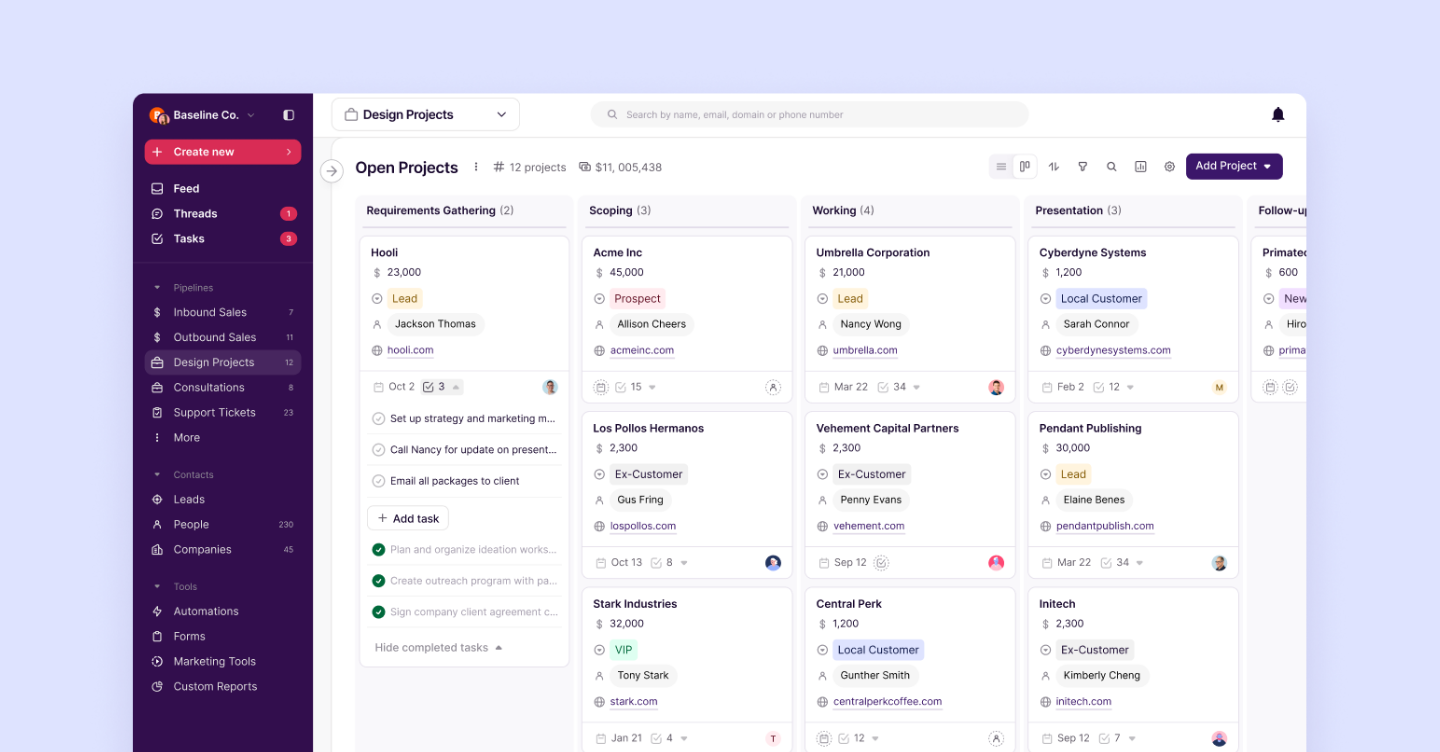
It also fits neatly into the collaboration tools your team already uses, so emails, docs, conversations, and tasks finally feel connected instead of scattered across different platforms (as they should’ve been all along).
What makes Copper stand out:
- Visual pipelines: Drag-and-drop, customizable pipelines for both sales and project workflows that make it easy to see what’s happening at a glance
- Task management: Built-in Tasks to assign work, set deadlines, and keep deals moving forward without anything slipping through the cracks
- Automation: Pipeline email automations triggered by stage changes so follow-ups happen without manual effort
- Lead capture: Website forms that automatically sort and route inquiries to the right pipeline or person
- Integrations: Connections with hundreds of other apps so your tools - from invoicing to email marketing — actually work together (finally!)
- Google Workspace integration: Seamless experience across Gmail, Docs, and Calendar so everything stays in sync
- Mobile app access: Manage relationships, update tasks, and track deals on mobile, whether you’re at your desk or on the move
It’s a CRM and task management software that feels intuitive from the start, without a steep learning curve or a long setup process slowing you down (which, honestly, is a win for everyone).
You can even give it a try for 14 days free.
2. Monday CRM
Best for: Visual teams
Monday CRM is for the “I need to see it to understand it” crowd (and honestly, that’s a lot of us).
Everything is built around bright, customizable boards that make your workflows feel less like a spreadsheet and more like something you actually want to interact with. You can drag deals around, switch between views, and organize tasks in a way that matches how your brain works (which is surprisingly rare in software).
It’s especially helpful for teams juggling a lot of moving pieces across projects, where visibility isn’t just nice to have—it’s necessary.
- Visual workflows: Colorful boards, Kanban views, timelines, and Gantt charts that make progress feel obvious at a glance
- Custom pipelines: Flexible setups that can handle both sales flows and project work without breaking a sweat
- Collaboration tools: Built-in updates and comments so your team isn’t chasing context across platforms
- Automation options: Simple triggers that take repetitive tasks off your plate (because you have better things to do)
One thing to keep in mind: all that flexibility means you’ll spend a little time setting it up—but once it clicks, it really clicks.
3. HubSpot
Best for: All-in-one solution
HubSpot is the overachiever of the group—it does a lot, and for many teams, that’s exactly the appeal.
You’ve got CRM, marketing tools, sales tracking, and task management all wrapped into one platform, which means fewer tools to juggle and fewer things slipping through the cracks. It’s built to support the full customer journey, from first touch to long-term relationship.
And yes, the free plan is a big draw. It lets you dip your toes into CRM and task management software without committing right away (which we love for you).
- All-in-one platform: CRM, marketing, sales, and tasks all living under one roof
- Task tracking: Assign and manage tasks tied directly to contacts and deals, so nothing floats around aimlessly
- Automation tools: Workflows that handle follow-ups and repetitive actions in the background
- Scalable features: More advanced reporting and customization as your team grows
The only catch? As you scale, things can get pricey pretty quickly—so it’s worth thinking ahead.
4. Pipedrive
Best for: Sales-focused teams
Pipedrive knows exactly what it is and it doesn’t try to be anything else.
This is a tool built for sales teams who want to stay focused, organized, and very clear on what’s happening in their pipeline at all times. Everything revolves around moving deals forward, which makes it feel clean, direct, and refreshingly no-nonsense.
If your team lives in “What’s the next step to close this?” mode, you’ll feel right at home here — and you’ll have a much easier time deciding how to prioritize deals based on where they stand.
- Pipeline management: A visual sales pipeline that makes it easy to see where every deal stands
- Activity tracking: Tasks, calls, and meetings tied directly to deals (so nothing gets lost in the shuffle)
- Sales automation: Reminders and workflows that keep deals from going cold
- Email integration: Sync and track conversations without hopping between tools
It’s not trying to manage every part of your business—and that’s kind of the point. It’s here to help you close.
5. Streak
Best for: Gmail-native experience
Streak is for the “please don’t make me leave my inbox” crowd — and honestly, that's valid.
It lives entirely inside Gmail, which means there’s no new system to learn and no extra tabs to manage. You can track deals, manage pipelines, and set up tasks right where your conversations are already happening.
It’s simple, lightweight, and surprisingly effective if your workflow already revolves around email.
- Gmail integration: Fully embedded in your inbox, so everything happens in one place
- Pipeline tracking: Manage deals directly within email threads (yes, really)
- Task management: Set reminders and follow-ups without breaking your flow
- Simple setup: Easy to get started without a long onboarding process
Because it keeps things minimal, it may not have the depth or advanced collaboration tools larger teams need—but for smaller teams or individuals, it just works.
Related: Alternatives to Streak CRM (and why Gmail users love Copper)
How to pick the right CRM for your team
Choosing CRM and task management software isn’t about finding the “most popular” option. It’s about finding the one that fits your workflow.
Here’s how to approach it without overcomplicating things.
Map your client journey from lead to delivery
Before you even start comparing tools, take a step back and map out how your work actually flows (yes, we’re doing a little strategy moment here—but it’s worth it).
Think about where your leads come from, what happens before a deal closes, and what the experience looks like after the sale. When you lay it all out, you’ll start to see patterns, gaps, and opportunities to optimize your process in ways that weren’t obvious before.
This step is especially helpful for small teams, where every part of the workflow matters and there’s less room for things to fall through the cracks. Once you can clearly see your journey, it becomes much easier to figure out what your CRM and task management software actually needs to support.
Score features against your must-have list
Not every feature deserves your attention and not every shiny feature deserves your time.
Start by identifying what your team truly needs to stay organized and move work forward. Then, use that list to evaluate your options so you can prioritize what matters instead of getting distracted by bells and whistles (we’ve all been there, adding things to a wishlist we absolutely don’t need).
Look for tools that help you optimize how work gets done, not just ones that add more features to manage. The goal isn’t complexity—it’s clarity.
Pilot with a small client project first
Rolling out a new system across your entire team on day one sounds ambitious, but it’s rarely the move.
Start small. Test your CRM and task management software with a single project or pipeline and see how it holds up in real life. Pay attention to how your team uses it, what feels intuitive, and where things get clunky.
This is also where you’ll notice things like notifications — are they helpful nudges that keep work moving, or are they overwhelming noise? (Because there is a difference, and it matters.)
You’ll learn more from a week of actual use than you ever will from demos or feature lists—and you’ll be able to adjust before scaling it out.
Emerging trends in automated task management
CRM and task management software is evolving quickly—and it’s not just adding features, it’s getting smarter in ways that actually help you get work done.
AI task suggestions and next-step prompts
Instead of just tracking your work, modern tools are starting to guide it.
With AI-powered features, your CRM can suggest next steps, remind you to follow up, and flag deals that need attention based on real activity. It’s like having a built-in assistant that understands your pipeline and helps you stay one step ahead (without you having to constantly check everything yourself).
No-code workflow builders
Automation used to feel intimidating. Now, it’s surprisingly approachable.
No-code builders let you create workflows visually, so you can customize how tasks are assigned, tracked, and completed without needing technical expertise. This is a huge win for small teams that want to optimize their processes without relying on developers or outside support.
Real-time project health dashboards
Visibility is everything—and the best tools don’t make you go searching for it.
Real-time dashboards give you a clear view of what’s on track, what’s falling behind, and where your team might be stretched too thin. You can prioritize work more effectively, adjust quickly, and keep everything moving without waiting for status updates or digging through reports.
Keep clients moving with one workspace
At this point, you’ve seen how much of a difference the right CRM and task management software can make. When your tools are connected, your work feels more organized, your team stays aligned, and it’s a whole lot easier to prioritize what actually matters.
The challenge isn’t finding a tool—it’s finding one that fits how your team already works, supports your business processes, and doesn’t slow you down with unnecessary complexity.
That’s where having everything in one workspace really starts to pay off.
Copper brings your contacts, pipelines, tasks, emails, and notifications together in a way that feels intuitive from the start, especially if you’re already using Google Workspace. It’s built to help you keep things moving without overcomplicating your day (which, let’s be honest, is the goal).
If you’re curious how it would fit into your workflow, it’s worth trying it out with a real project and seeing how it feels in practice.