
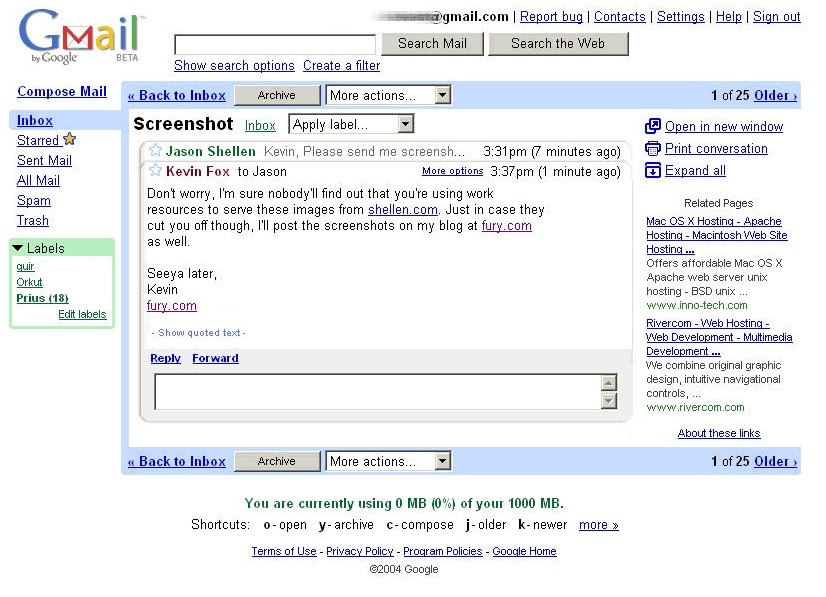
On August 28, 2006, Google quietly launched something called Google Apps for Your Domain. It was a bundle of Gmail, Google Calendar, Google Talk, and Google Page Creator, built for small businesses that wanted Google's tools running on their own domain. No confetti, no keynote. Just a signup page and a pretty good idea.
Twenty years, three rebrands, and roughly a thousand product launches later, that scrappy bundle is Google Workspace. It's the productivity suite billions of people now use to send email, run meetings, and (if you're one of our customers) manage an entire client pipeline without ever leaving Gmail.
So this month, we're doing what any longtime friend does on a big birthday. We're pulling out the old screenshots, making a list of our favorite glow-ups, and asking what's coming next.
Here's how much Google Workspace has changed since 2006
Back in 2006, Google Apps for Your Domain got you 2GB of Gmail storage, a shared calendar, and a basic website builder. There was no Drive (that didn't show up until 2012). No real-time co-editing. No video calls, either. Google Talk was text and voice only. If you wanted your team on the same page, you were emailing attachments back and forth and hoping nobody was working off the wrong version.
Today, Google Workspace is closer to an AI-assisted operating system for work. You get real-time collaborative docs, a video platform that transcribes and summarizes your meetings for you, and a built-in assistant that can draft your emails, build your spreadsheets, and now (as of this month) answer questions right inside Google Chat. It's a genuinely different product wearing a familiar interface.
8 Google Workspace updates we're glad they made
If you want the full rundown of what's included in Google Workspace today, we've got you covered. For now, here are the additions that changed the game for us:
- Google Drive (2012). This is the moment "cloud storage" stopped being a buzzword and started being where your files actually lived.
- Google Meet going mainstream (2017, then everywhere in 2020). What started as a modest Hangouts spin-off became the thing that kept entire companies running in 2020, virtual backgrounds and all.
- Smart Compose and Smart Reply in Gmail (2018). This was the first time Gmail finished your sentence for you, and it somehow felt both a little strange and genuinely useful.
- Smart Canvas in Docs (2021). Checklists, smart chips for people and files, and tables that behave like mini databases turned Docs from "just a word processor" into a real project space.
- Google Workspace Individual (2021). Freelancers and solopreneurs finally got the same premium Meet and Gmail features that used to be locked behind a business account.
- Gemini woven into every app (2023 to 2025). Drafting emails in Gmail, summarizing meetings in Meet, building tables in Sheets, generating slides in Slides. AI stopped being a separate tool and became a layer across the whole suite.
- NotebookLM for Workspace. You can turn a pile of dense documents into an actual, searchable knowledge base (and, honestly, it's a fun way to make yourself an audio summary of a 40-page brief).
- Interactive dashboards inside Sheets (2026). Google announced this one at Cloud Next this year: real mini apps like kanban boards, heat maps, and live dashboards, built directly in a spreadsheet, pulling in data from tools like HubSpot and Salesforce.
Here's what's coming next for Google Workspace
Google didn't ease off the gas heading into this birthday. Here's what to watch for:
- Ask Gemini in Chat rolls out starting August 26. It's a unified command bar inside Google Chat that can search across your Gmail, Drive, and Calendar, summarize conversations, draft content, and schedule meetings without switching apps. The rollout happens gradually over about two weeks, with expanded usage limits free through October 1.
- Skills for agentic automation in Workspace Studio let teams build and share automations, like auto-checking new invoices against old ones, the same way they'd share a doc.
- Gemini Enterprise integration lets you schedule meetings and create or edit Docs and Slides without leaving the Gemini app.
- A dedicated Workspace MCP Server (in preview) gives developers a standard way to plug Workspace data into their own AI applications, with an official Workspace CLI on the way.
- Faster migration tools from Microsoft 365, including an AI-powered macro converter, for teams finally making the jump.
Twenty years in, the pattern hasn't changed much. Google keeps trying to collapse "the tools you use for work" into fewer, smarter places to be. First it was five apps under one login. Now it's an AI layer that follows you across all of them.
Here's where Copper fits into all of this
We've built Copper entirely inside Gmail and Google Workspace since day one. That means we've had a front row seat to basically every update on this list. Every new Gemini feature, every Smart Canvas trick, every Workspace update, we've had to ask ourselves: how does this make CRM work better for the people using it? Usually, the answer has been "a lot."
It's also part of why Copper is the only client and project management tool that's a Recommended for Google Workspace app, and the only CRM backed by Google Ventures. We're all in on this ecosystem, which means you never have to switch tabs to add contacts, track conversations, find files, or manage tasks.
Don't just take our word for it. Here's what Chandler Navarrete, from the team at Polymath, had to say about getting started with Copper:
"With Copper, there was almost no setup time since it worked with Gmail. Plus, there were all these integrations that we could use right away. We were sold."
If your team already lives in Gmail and Calendar all day, you don't need another tool competing for your attention. You need one that fits right into the workflow you already have.
Try Copper for 14 days free and see what 20 years of Google Workspace updates have made possible.